BACK
I'm batman

Raft AI (Series B)
Redesigning the Extraction Table at Raft: Tackling Exception Workflows
Problem statement
Raft's extraction table was the most critical - and most problematic - feature in our platform. While I'd successfully designed other tables for configurations and automations, this extraction table was the one everyone was afraid to touch.
Despite being our most-used feature for managing exceptions, the table created significant user friction:
Usability Issues:
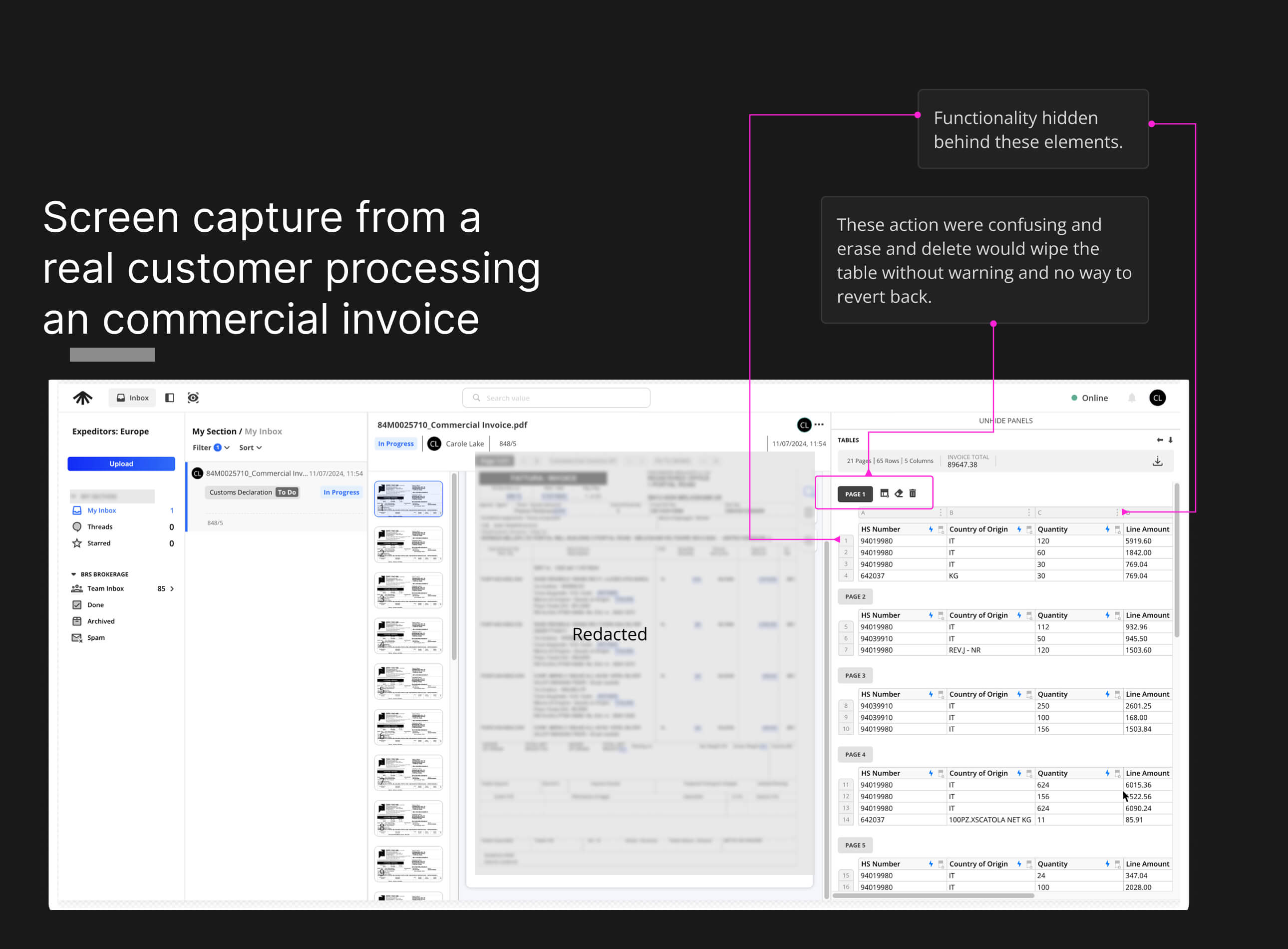
Tools and features were buried and hard to discover
Confusing icons with unclear meanings clustered together
Features weren't designed around specific jobs-to-be-done
Data was too small for our primary users (mid-40s professionals)
Powerful capabilities went unused because they were hidden
Functionality Gaps:
No synchronization with our AI - adding rows/columns didn't trigger automatic data detection
Missing Excel-like interactions users expected (drag to duplicate, copy-paste between cells)
No error recovery options, creating stress around mistakes
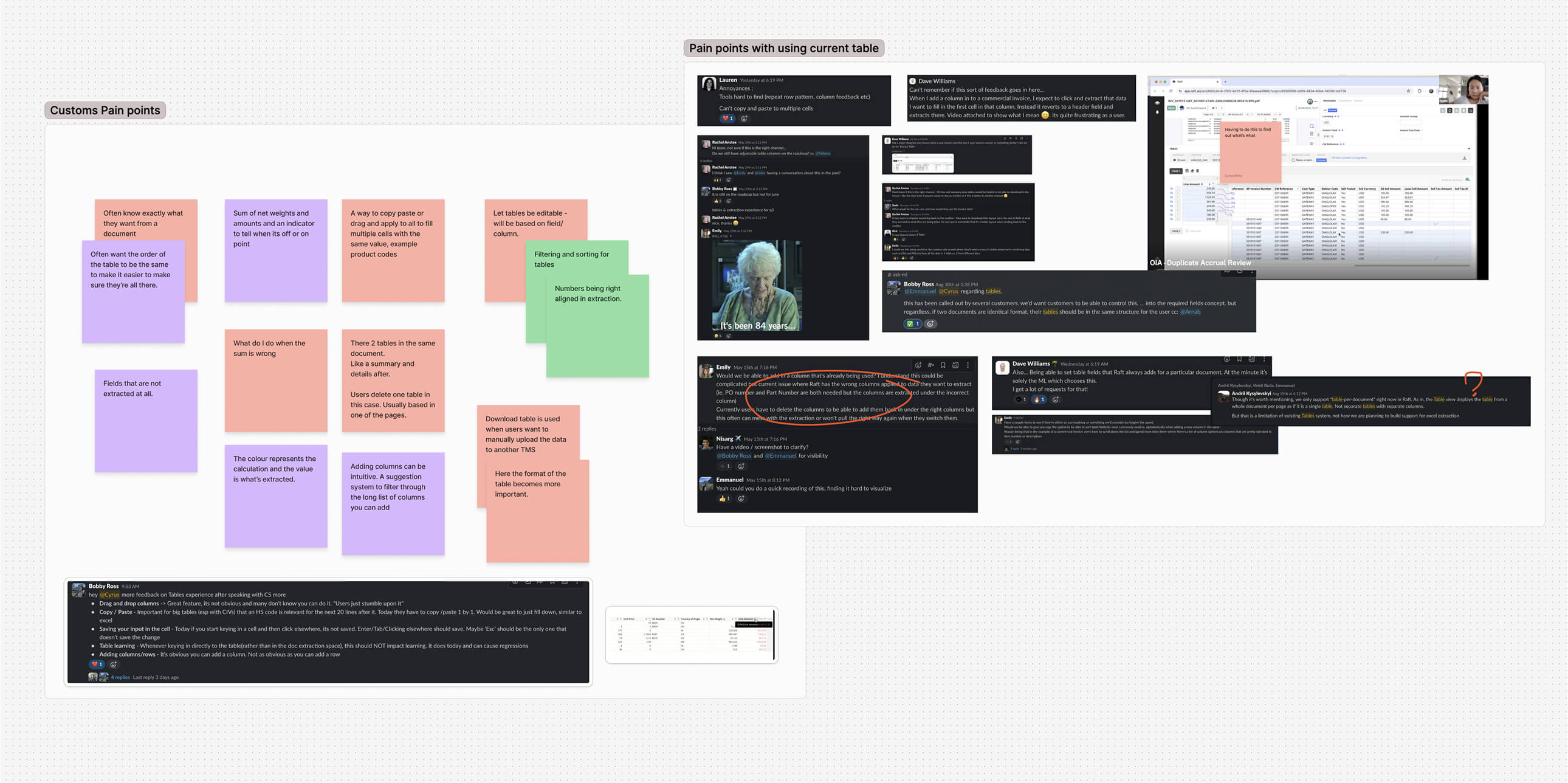
The customer feedback spoke for itself - our support team was fielding constant complaints about table usability.
Constraints
Change Aversion - Many users were deeply familiar with existing workflows, making adoption of new patterns an uphill battle.
High Stakes for Errors - Mistakes weren’t just UX bugs; they meant drops in productivity, ML model regression, and direct financial loss for customers.
Screen Real Estate Assumptions -The product was built with large laptop screens in mind, limiting usability for smaller displays or on-the-go contexts.
Heavy Tech Debt - Even minor UI adjustments often required navigating legacy code and complex dependencies, slowing down iteration cycles.
My Role
Lead designer responsible for creating scalable components used across all Raft products. This wasn't just about redesigning one screen - it was about establishing interaction patterns that would work system-wide.
My Approach
Understanding the Challenge
The word "tables" could trigger heated discussions at Raft due to their complexity and the significant technical investment already made. Given the stakes, I took a comprehensive research approach:
Research Process:
Analyzed user feedback from sales and customer support calls
Gathered insights from our sales and customer success teams
Studied how our ML and computer vision models integrated with the user experience
This helped me understand not just what users were struggling with, but why these struggles existed in the context of our AI-powered platform.
Mapping Existing Functionality
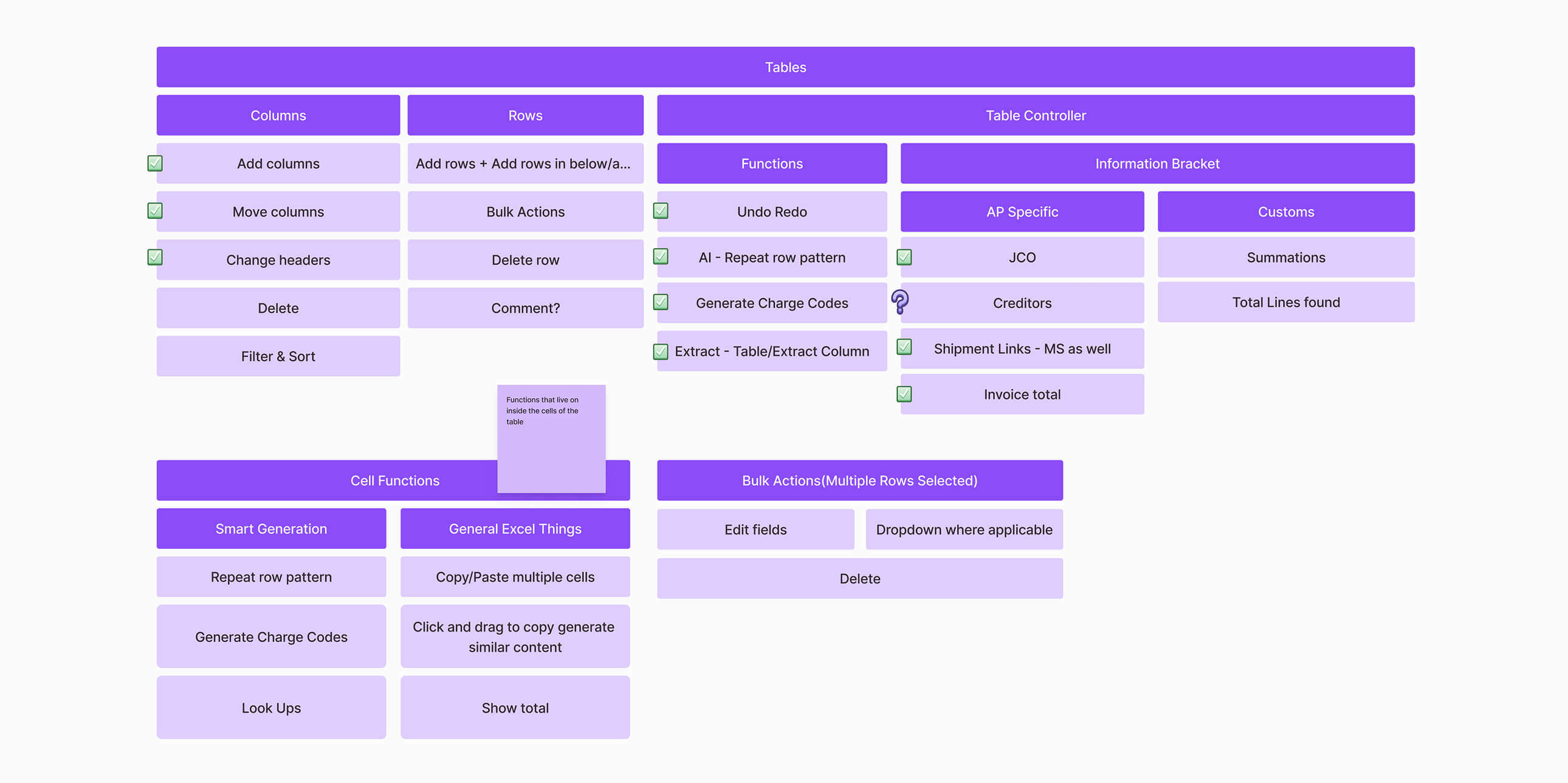
Before redesigning anything, I needed to understand exactly what we'd built. Given the feature density and importance of this component, missing existing functionality wasn't an option.
Audit Process:
Catalogued all existing features within tables across each product (Accounts Payable, Customs, Operations)
Documented the various states that could exist within a table
Mapped user workflows click-by-click based on their jobs-to-be-done
This comprehensive mapping revealed just how complex our table interactions had become and where the biggest pain points lived.
Solution Approach
Rather than starting from scratch, I focused my prototyping efforts on the edge cases - the exceptions and error states where users experienced the most frustration. In Raft's AI-first approach, when everything works perfectly, users barely touch the interface. The real design challenge was in handling the exceptions gracefully.
Bringing Power Features to the Surface
Clear Action Toolbar:
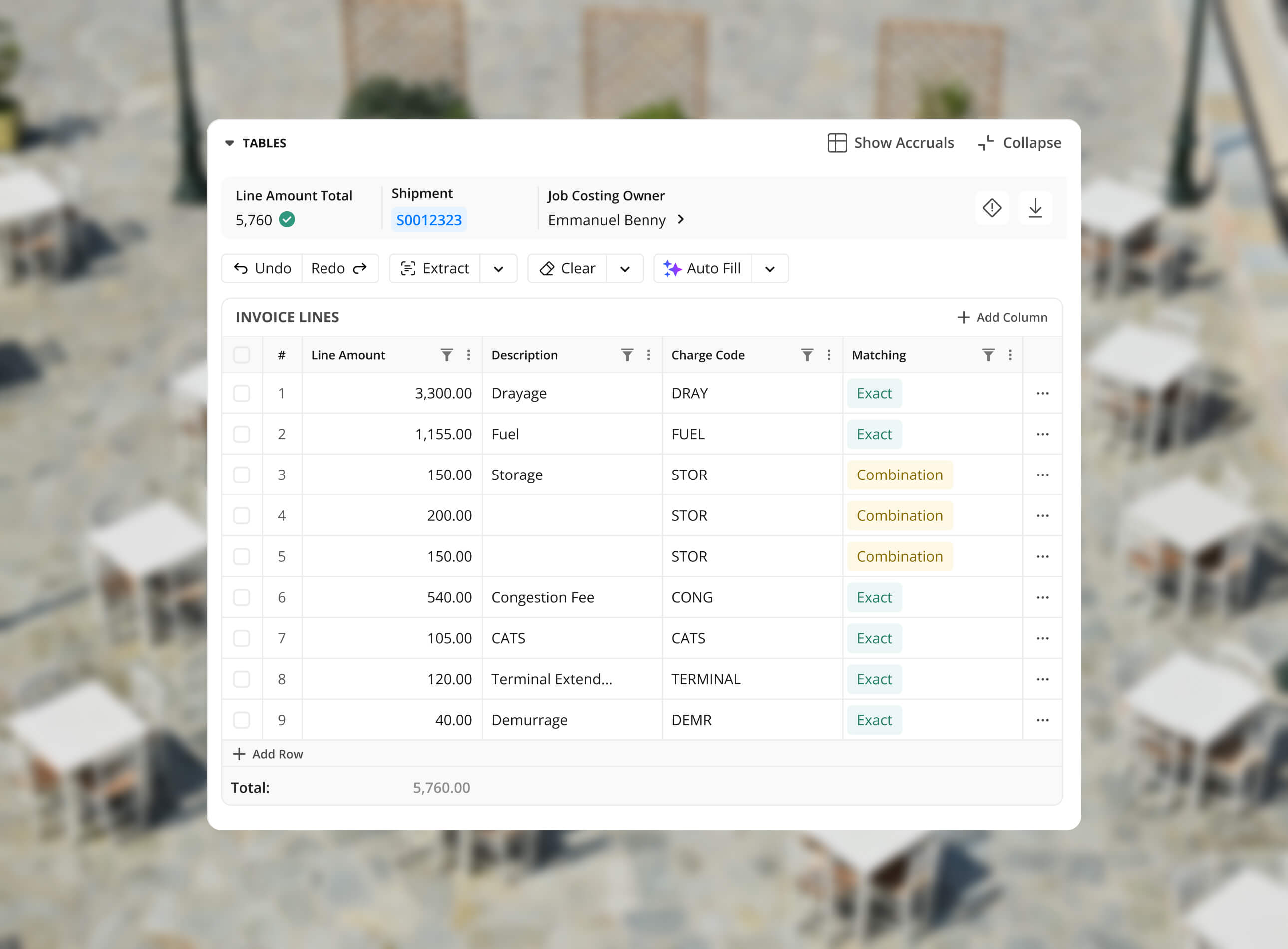
Replaced cryptic icons with explicit action buttons
Added undo/redo functionality to reduce user anxiety around mistakes
Consolidated AI-powered features under a single "autofill" function
Improved visual hierarchy and readability
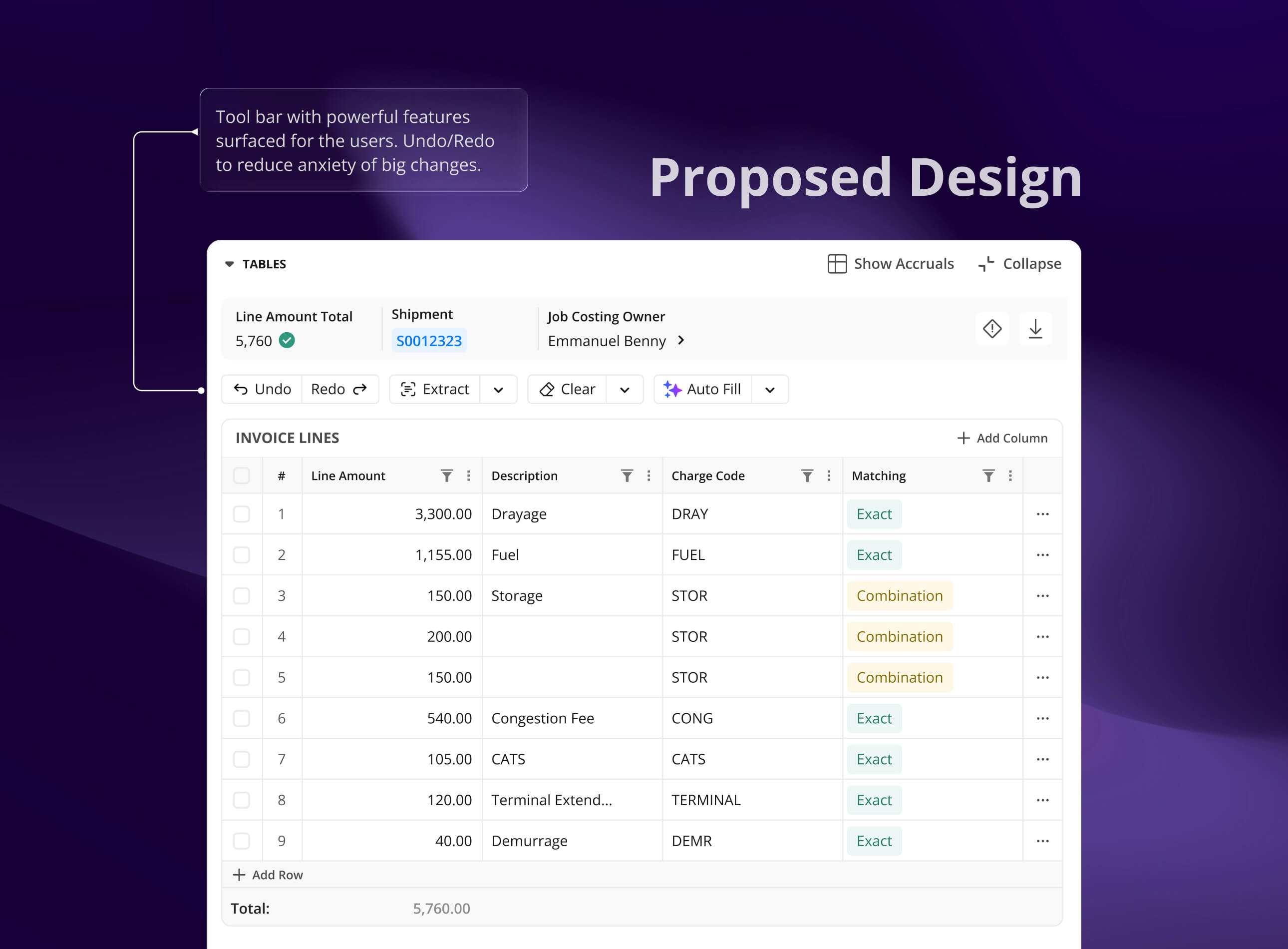
Excel-Inspired Interactions
Understanding that our users lived in Excel, I designed familiar interaction patterns that would feel natural while being technically feasible for our engineering team to implement.
These interactions focused on giving users the speed and efficiency they expected from spreadsheet software within our AI-powered platform.

Familiar Extraction
The new extraction table maintains all existing functionality while dramatically improving discoverability and usability. Users can now quickly access powerful features, recover from errors easily, and work with the familiar interaction patterns they expect.
The solution balances user needs with technical constraints while setting up patterns that scale across our entire product suite.
Impact
Simplified complexity: Turned a feature users dreaded into something approachable, replacing scattered, cryptic controls with one clear toolbar.
Confidence unlocked: Introduced undo/redo so users could experiment without fear.
Made power discoverable: AI tools and autofill features that were hidden before are now surfaced in a way that users actually use.
Familiar, not foreign: Excel-style copy-paste and drag interactions gave users speed and comfort
User delight in the small things: Larger, more legible data cells and clearer icons reduced the everyday micro-frustrations of mid-career professionals.
Other case studies

MAGIC AI (Seed Funded)
Building Touch-First Navigation for a Premium Fitness Device
MAGIC AI (Seed Funded)
Designing the AI Personal Trainer Experience
Raft AI (Series B)
How a UX Redesign Concept Transformed Product Strategy
Raft AI (Series B)
UI Components Simplified: Taming the Pack Header Chaos
Raft AI (Series B)
Redesigning the Extraction Table at Raft: Tackling Exception Workflows
Raft AI (Series B)
Redesigning Raft's Document Manager

Sats
Sats - Nigeria's P2P Crypto App
Read
0%